
Description


Price: $599.00 – $139.99
Details)
Processor:Intel Celeron N4500 (2C / 2T, 1.1 / 2.8GHz, 4MB L3)
Graphics:
Intel UHD Graphics
Chipset:
Intel SoC Platform
Memory:
8GB DDR4 RAM
Storage:
256GB SSD M.2 PCIe NVMe
Optical:
None
Audio chip:
High Definition (HD) Audio, Realtek ALC3287 codec
Speakers:
Stereo speakers, 1.5W x2, Dolby Audio
Camera:
HD 720p with Privacy Shutter
Microphone:
2x, Array
Power Adapter:
45W Round Tip (3-pin)
Display:
15.6″ FHD (1920×1080) TN 250nits Anti-glare
Keyboard:
Non-backlit, English
Touchpad:
Buttonless Mylar surface multi-touch touchpad, supports Precision TouchPad (PTP)
Case Color:
Black
Dimensions (WxDxH):
359.2 x 235.8 x 19.9 mm (14.14 x 9.28 x 0.78 inches)
Weight:
Starting at 1.7 kg (3.75 lbs)
Ethernet:
100/1000M (RJ-45)
WLAN + Bluetooth:
Wi-Fi 6, 802.11ax 2×2 + Bluetooth 5.2
Standard Ports
- 1x USB 2.0
- 1x USB 3.2 Gen 1
- 1x USB-C 3.2 Gen 1 (support data transfer only)
- 1x HDMI 1.4b
- 1x Headphone / microphone combo jack (3.5mm)
- 1x Ethernet (RJ-45)
- 1x Power connector
Security Chip:
Firmware TPM 2.0 Enabled
Physical Locks:
Kensington Nano Security Slot
Other Security:
Camera privacy shutter
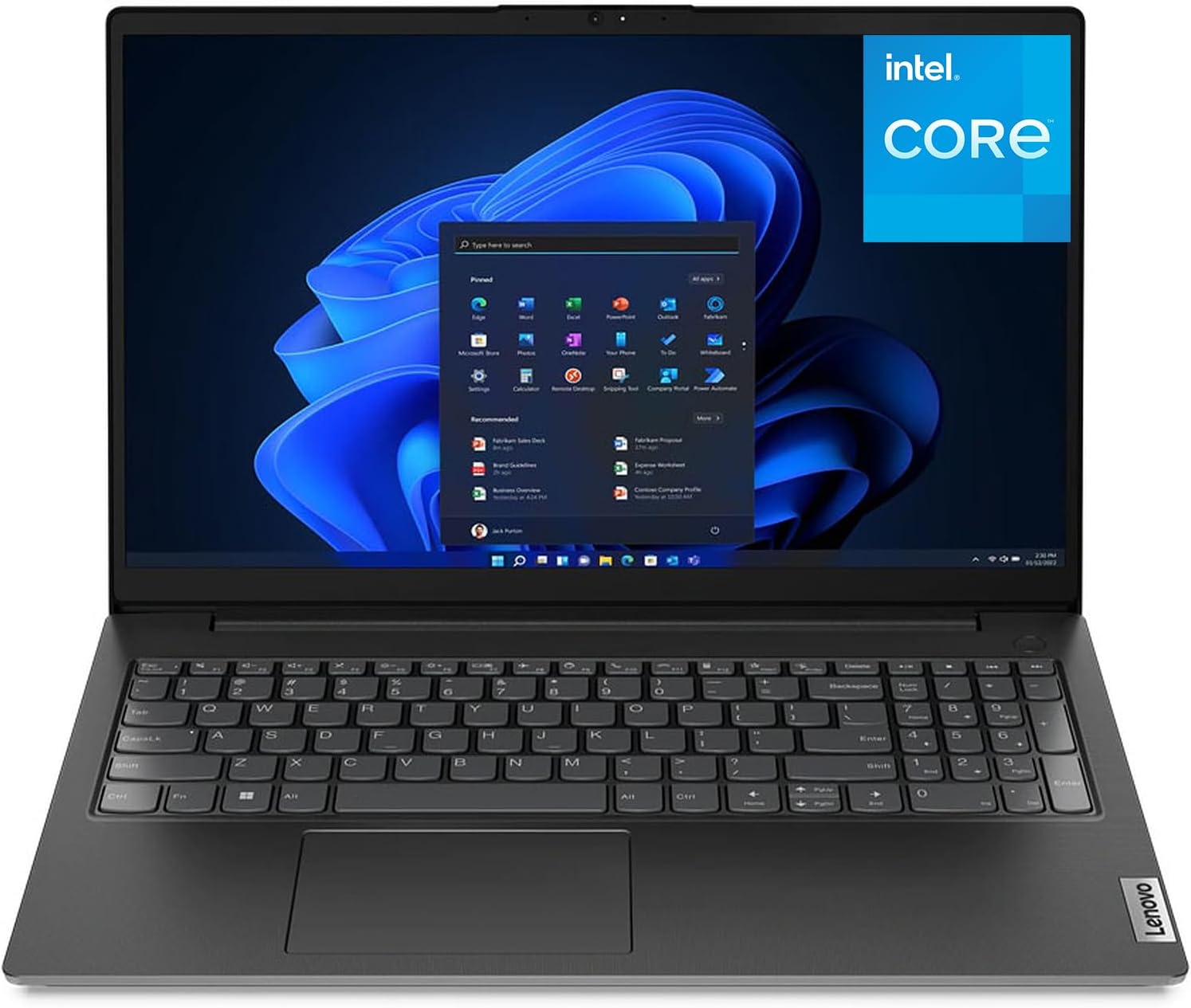
Customers enjoy the V15 G2 15.6″ FHD Laptop for its budget-friendly price, lightweight design, and user-friendly interface. It is suitable for basic tasks such as web browsing, word processing, and watching videos. Designed to make short work of everyday tasks, including schoolwork and light gaming, this laptop features an Intel Celeron N4500 processor (2C, 4MB Cache, Up to 2.8GHz).
The V15 G2 15 is exactly what you need in an everyday use laptop. Watch shows on an expansive up to 15.6″ FHD (1920×1080) Anti-glare display with a razor-thin frame. Listen to rich and clear audio from two Dolby Audio speakers. And connect with friends and family via the HD 720p with Privacy Shutter webcam, which also prevent unauthorized viewing. powered by integrated Intel UHD Graphics.
8GB DDR4 Memory ensuring smooth multitasking and effortless switching between applications; 256GB PCIe SSD, providing ample space for your files, documents, and business data.
Wi-Fi 6, 802.11ax 2×2 + Bluetooth 5.2; 1x USB 2.0, 1x USB 3.2 Gen 1, 1x USB-C 3.2 Gen 1, 1x HDMI 1.4b, 1x Ethernet (RJ-45), 1x Headphone / microphone combo jack (3.5mm), 1x Power connector.
Black.
Reviewer: Melissa Grider
Rating: 5.0 out of 5 stars
Title: Works great
Review: Works great! Love the included keypad, really helps with my business administration.
Reviewer: Richard L. Kelso
Rating: 5.0 out of 5 stars
Title: Fast
Review: Well pleased , computer is fast and up to date
Reviewer: Melodie
Rating: 1.0 out of 5 stars
Title: This laptop was altered, which caused it to be very unstable.
Review: This review is specifically for the Lenovo IdeaPad 1 laptop that’s advertised with 1T Hard Drive and 32 GB RAM. I mention this because I’m seeing reviews here for several different items.I am a long time Lenovo fan and ended up purchasing this when I needed to replace my tried and true Yoga x380 that was lost or stolen on a recent flight. I needed something fast and cheap and this seemed to fit the bill. But I’ve had nothing but trouble with this since the day it arrived two weeks ago.I went to the Lenovo site and used their online tool to detect this unit, and tried to use the diagnostic tools but they kept crashing and could not detect an onboard fan. I spoke with Lenovo support who told me that this unit is sold with a 256 G hard drive and only 8 G of RAM. Needless to say I was shocked.I was going to just have Lenovo fix it since it’s still under warranty (9 months according to their site) And I certainly wouldn’t mind having 32 G RAM or the 1T hard drive, as that’s what I thought I was purchasing. But they said they won’t fix it, as it’s clearly been tampered with. Lenovo informs me that the system will not support those upgrades, which is why it’s so unstable. They Lenovo did send me the specs for this unit and the comparison with the those that the scan tool picked up confirms those that the scan tool picked up confirms that this laptop was altered.To say that I’m disappointed is an understatement. I’m sending this unit back and praying that I can find another one that is what it says it is straight out of the box.
Reviewer: Monique Lin
Rating: 4.0 out of 5 stars
Title: Reliable delivery and quality, perfecto!
Review: The laptop was delivered to my door since 11am on Saturday morning, but I didn’t get any notification of the delivery. I was getting worried and logged in to check. It turned out that they just forgot to tell me. I’m quite happy with the quality of Lenovo after my boyfriend set it up for me. The color was described as cloud grey, but it’s a bit lighter grey than I expected. Grey of a darker shade will be preferred.My favorite color is cosmic blue. But it wasn’t available to be delivered until next week. I couldn’t wait. Hopefully, I’m going to get it in cosmic blue next time.
Reviewer: Lynette Windhorst
Rating: 5.0 out of 5 stars
Title: Enhanced Connectivity and Efficiency
Review: The Lenovo ThinkPad Pro Dock 40A10090US Docking Station is a powerful accessory designed to enhance connectivity and productivity for Lenovo ThinkPad users. With its sleek design and versatile features, this docking station provides a seamless solution for expanding your workspace and simplifying your daily workflow. In this review, we will delve into the key features and benefits of the Lenovo ThinkPad Pro Dock, highlighting its performance, connectivity options, and overall value.One of the standout features of the ThinkPad Pro Dock is its extensive connectivity options. Equipped with a range of ports, including multiple USB 3.0 ports, DisplayPort, DVI-D, VGA, and Gigabit Ethernet, this docking station allows you to connect a variety of peripherals, monitors, and network devices with ease. Whether you need to connect external displays for a multi-monitor setup or transfer data quickly, this dock offers the necessary ports to accommodate your needs.The ThinkPad Pro Dock enables you to transform your laptop into a full-fledged workstation. Simply connect your ThinkPad to the dock, and you gain access to additional USB ports, allowing you to connect external keyboards, mice, printers, and other accessories. The docking station also supports dual monitor setups, allowing you to extend your desktop workspace for improved multitasking capabilities. With the ThinkPad Pro Dock, you can seamlessly transition from a mobile setup to a more efficient and comfortable workstation.The Lenovo ThinkPad Pro Dock offers a hassle-free docking experience. With its one-step slide-in mechanism, you can quickly and securely dock your ThinkPad without the need for complex cable connections or manual adjustments. The dock ensures a reliable connection, providing power to your laptop and instantly connecting it to all the peripherals connected to the dock. This streamlined docking process saves you time and eliminates the frustration of dealing with multiple cables.Lenovo is known for its commitment to quality, and the ThinkPad Pro Dock is no exception. With its robust construction and reliable performance, this docking station is built to last. The dock’s compact design allows it to sit discreetly on your desk, saving space and reducing cable clutter. Additionally, the dock features a Kensington lock slot, providing an added layer of security to protect your valuable equipment.The ThinkPad Pro Dock is designed specifically for Lenovo ThinkPad laptops, ensuring seamless compatibility and easy integration. The docking station is simple to set up, requiring minimal effort to get your workstation up and running. The dock also supports hot-swapping, allowing you to connect and disconnect your ThinkPad without restarting the system, further enhancing convenience and flexibility.The Lenovo ThinkPad Pro Dock 40A10090US Docking Station offers a comprehensive solution for ThinkPad users seeking enhanced connectivity and productivity. With its wide range of ports, streamlined docking experience, and sturdy construction, this docking station provides a seamless and efficient workstation setup. Whether you need to expand your connectivity options, connect multiple monitors, or create a more organized and clutter-free workspace, the ThinkPad Pro Dock delivers on its promises. Upgrade your ThinkPad experience with the Lenovo ThinkPad Pro Dock and elevate your productivity to new heights.
Reviewer: EMW
Rating: 3.0 out of 5 stars
Title: 3
Review: Bought so my kid could play genshin and large storage games. Storage obviously isn’t a problem neither is battery! But the processing speed for really large games is lacking. For simple games this computer works great. However, graphics and movement severely lag.
Reviewer: Anna NanaAmazon Customer
Rating: 5.0 out of 5 stars
Title: Anna Nana’s computer
Review: So far it is fine!
Reviewer: Erin K Stevenson
Rating: 5.0 out of 5 stars
Title: Very nice laptop
Review: I just received my new laptop and I’m really enjoying it. It’s been a while since I’ve had a computer so I’m still familiarizing myself with it. The set up was easy and the screen is a nice size.
Reviewer: Dan Krichel
Rating: 5.0 out of 5 stars
Title:
Review: Heel fijne tablet, aangeschaft als 2e kans deal en voor die prijs is dit echt een heel goede Android tablet. Hij is ingesteld als Home Assistant scherm en werkt perfect.
Reviewer: Anthony
Rating: 5.0 out of 5 stars
Title:
Review: Very good to dock your compatible thinkpad. Solid and easy to dock in.
Reviewer: Esemes
Rating: 4.0 out of 5 stars
Title:
Review: Bardzo dobry tablet do czytania i oglądania. Po długiej aktualizacji działa sprawnie i szybko. Czasami dużej wczytuję no ale to nie ufs.
Reviewer: Emmanuel Joya
Rating: 5.0 out of 5 stars
Title:
Review: Alta calidad en el producto, todo llego en tiempo y forma a Playa del Carmen Quintana Roo México. Lo recomiendo y volvería a comprar lo recomienda al 100%
Reviewer: nao.nao
Rating: 5.0 out of 5 stars
Title:
Review: ThinkPadがとっても使いやすくなりました。


